

Have you ever thought about creating a virtual assistant that answers questions about you intelligently and contextually? That's exactly what I've developed, and I want to share with you how it works on the inside.
The Project: A Personal Virtual Assistant
I've created a chatbot that acts as my digital representative. It's not just another bot giving generic answers, but a trained assistant specifically equipped with information about my professional experience, projects, and expertise. And best of all, it's available 24/7. my website.
Architecture: RAG in Action
What is RAG?
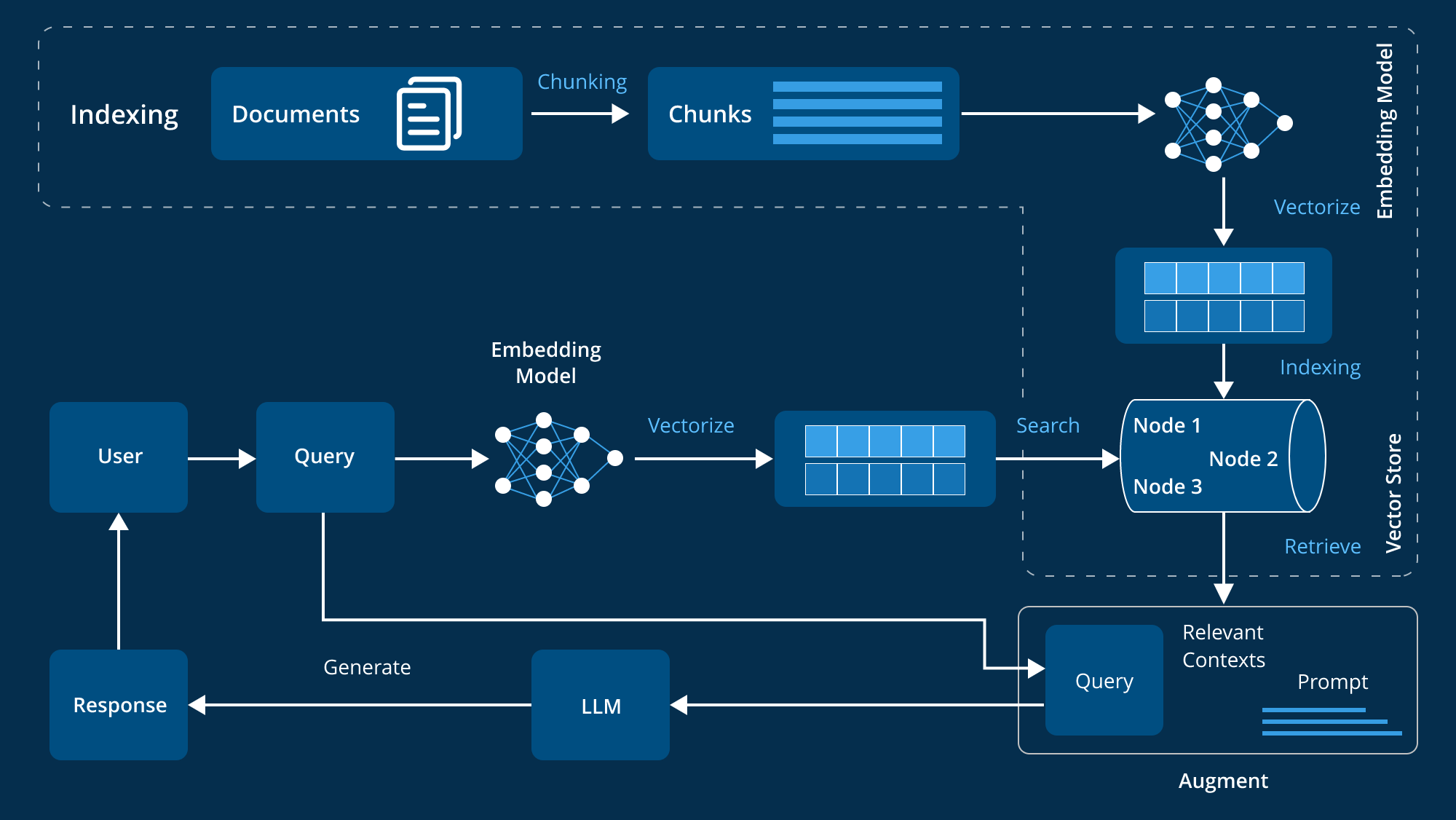
Retrieval-Augmented Generation (RAG) is a technique that combines searching for relevant information with generating coherent responses. Instead of relying solely on the model's pre-trained knowledge, RAG searches for specific information in a database and uses it to generate more accurate and contextual responses.
The Backend: The Brain of the System
FastAPI as a Spinal Column
I chose FastAPI for its speed, ease of use, and excellent support for asynchronous APIs. The backend structure is organized as follows:
app/ ├── main.py # Entry Point ├── config.py # Configuration ├── routes/ # Endpoints ├── services/ # Business Logic ├── models/ # Data Models └── dependencies/ # Authentication and Dependencies
The RAG Flow Step by Step
- Document IngestionPDF and TXT documents are processed and divided into semantically coherent chunks using LangChain.
- EmbeddingsEach chunk is converted into a numeric vector using OpenAI Embeddings, capturing the semantic meaning of the text.
- Pinecone StorageThe vectors are stored in Pinecone, a vector database specialized in ultra-fast semantic searches.
- Semantic SearchWhen a question arrives, it becomes embedding and the most similar chunks are searched for in Pinecone.
- Contextual GenerationThe relevant chunks are sent along with the question to GPT-3.5-turbo to generate a well-founded response.
The Frontend: React with Material-UI
The frontend is built with React and TypeScript, offering a modern and responsive interface. It uses Material UI for a consistent and professional design.
Key Features:
- Real-time chat with writing indicators
- Full page mode for extended conversations
- Administration Panel for document management
- Custom theme that reflects my visual identity
- Responsive for an optimal experience on any device
Deployment and Production
BackendDeployed on Heroku with Docker configuration
FrontendDeployed on Netlify with continuous integration from GitHub
Vector DatabasePinecone in the cloud
AI ModelOpenAI GPT-3.5-turbo
Why This Approach?
- PrecisionRAG ensures that the answers are based on real and specific information
- ScalabilityPinecone handles millions of vectors with search times in milliseconds
- FlexibilityI can update the knowledge base without retraining the model
- Cost-efficiencyUsing the GPT-3.5-turbo instead of larger models keeps costs down
Results and Lessons Learned
The chatbot not only answers questions about my experience, but it does so in a conversational and contextual way. Here are some examples of what it can do:
- Explain specific projects with technical details
- Recommend my profile for specific roles
- Provide contact information and availability
- Discuss relevant technical skills and experience
Want to try it?

You can interact with my virtual assistant directly in germanmallo.com. Ask him about my projects, experience in Data Science, or any aspect of my professional profile.
Has this project inspired you? Do you have any technical questions about implementation? Leave me a comment, or better yet, ask my chatbot directly! 😄
Full stack: Python, FastAPI, LangChain, OpenAI, Pinecone, React, TypeScript, Material-UI, Docker, Heroku, Netlify.
Do you want to implement something similar? I'd be happy to help. Let's connect And let's talk about how AI can boost your digital presence.